%20skewX(-10.5)%20translate(-32%20-32)'%3e%3cpath%20d='M49.75%2015H29A8.5%208.5%200%200%200%2029%2032H35A8.5%208.5%200%200%201%2035%2049H14.25'%20fill='none'%20stroke='%2316130E'%20stroke-width='9.5'/%3e%3c/g%3e%3cg%20transform='translate(82%2013)%20scale(1.02)'%20fill='%23E9E3D5'%3e%3cpath%20d='M2%205.5C2%202.46%204.46%200%207.5%200H25v6H8v5h13c3.31%200%206%202.69%206%206v9c0%203.31-2.69%206-6%206H2v-6h18v-9H7.5A5.5%205.5%200%200%201%202%2011.5v-6Z'/%3e%3cpath%20d='M34%209h22v6H41v11h15v6H40c-3.31%200-6-2.69-6-6V15c0-3.31%202.69-6%206-6Z'/%3e%3cpath%20d='M63%209h19c3.31%200%206%202.69%206%206v5c0%202.29-1.28%204.28-3.16%205.29L90%2032h-8l-4.5-6H70v6h-7V9Zm7%206v5h11v-5H70Z'/%3e%3cpath%20d='M105%209h8l13%2023h-8l-2.5-5h-13L100%2032h-8l13-23Zm.5%2012h7l-3.5-7-3.5%207Z'/%3e%3cpath%20d='M131%209h19c3.31%200%206%202.69%206%206v7c0%203.31-2.69%206-6%206h-12v4h-7V9Zm7%206v7h11v-7h-11Z'/%3e%3cpath%20d='M163%209h24v6h-17v3h14v5h-14v3h17v6h-24V9Z'/%3e%3cpath%20d='M194%200h7l16%2020V0h7v32h-7l-16-20v20h-7V0Z'/%3e%3cpath%20fill-rule='evenodd'%20d='M231%209h28v23h-28V9Zm7%206v11h14V15h-14Z'/%3e%3cpath%20d='M264%209h7l4%2015%204-15h7l4%2015%204-15h7l-7%2023h-8l-4-12-4%2012h-8l-6-23Z'/%3e%3c/g%3e%3c/svg%3e)
Use ScrapeNow when the data is visible on the page and you want a repeatable table, but you do not want to inspect markup or maintain extraction code. Add field names such as title, price, availability, rating, or product URL. Those fields become the structure of the returned dataset.
Three steps
From webpage to spreadsheet-ready rows
Add the page
Paste one URL, several URLs, or use pagination discovery for a connected listing.
Name the columns
Describe the fields you need in plain language and arrange their final order.
Review the rows
Inspect the structured table, resize columns, then export the result as CSV or JSON.
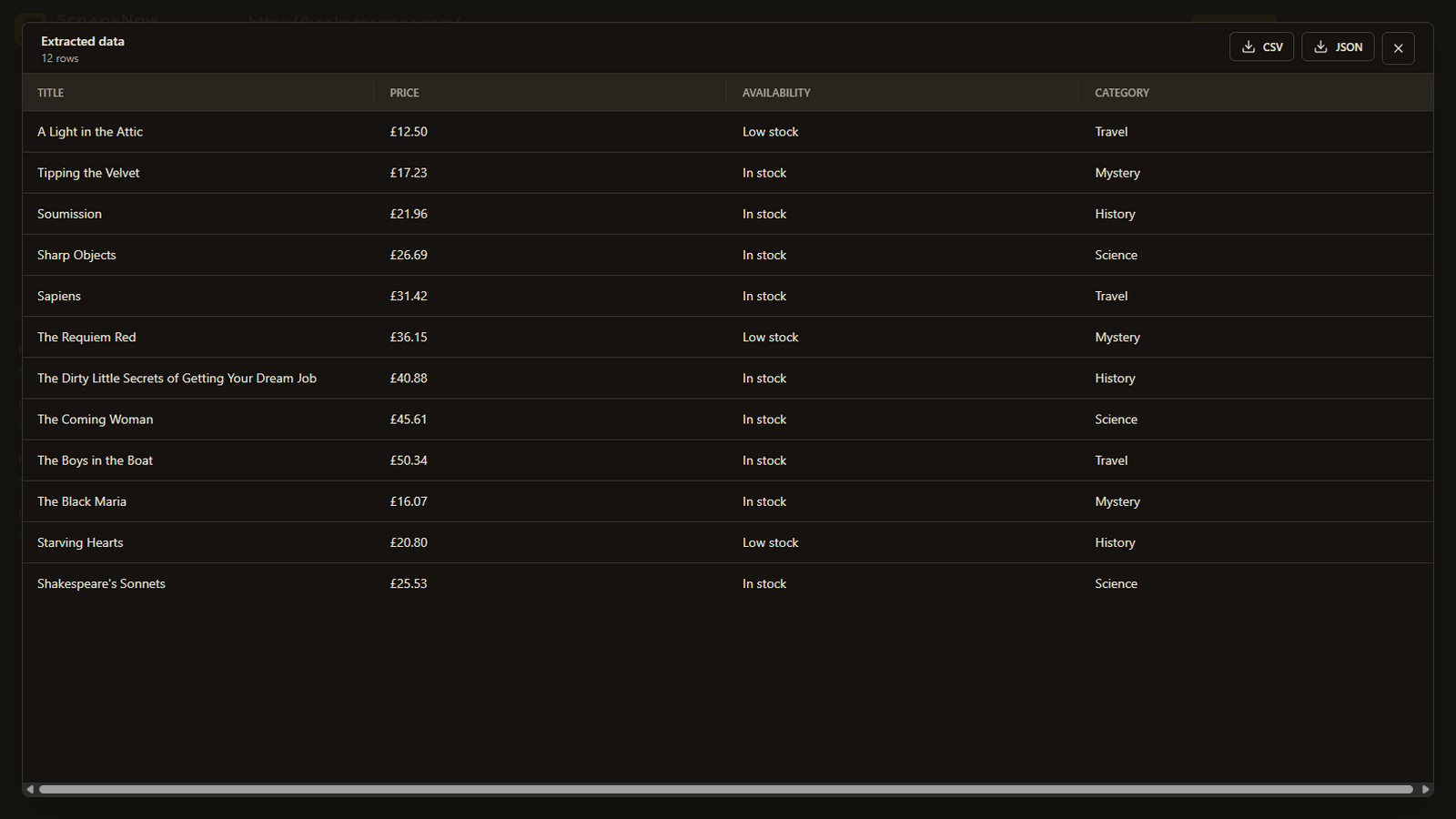
Example schema
You decide what becomes a column
For a product collection, a useful first schema might be:
| Requested field | What ScrapeNow looks for | CSV result |
|---|---|---|
| title | The visible product or record name | A title column |
| price | The price associated with that record | A price column |
| availability | The visible stock or availability state | An availability column |
| product URL | The record link when it is present in the captured content | A product URL column |
Specific field names produce a more useful schema than a vague request such as “get everything.” Start with the smallest dataset you actually need, inspect a few rows, and then add fields.
Real-web support
CSV extraction is not limited to static pages
If the data appears only after a filter, login, cookie prompt, or other interaction, use a visible capture mode and prepare the page personally. ScrapeNow extracts the page state you reached rather than asking you to recreate every interaction as a cloud automation.
Apply filters, navigate tabs, or scroll to the content before continuing the capture.
Use the same field list across a URL collection so the combined result stays tabular.
Sign in inside the visible local browser. Browser credentials are not sent to hosted extraction.
Inspect returned rows and column values before using the resulting CSV downstream.
Honest limitations
What this workflow does not promise
- ScrapeNow does not bypass authentication, CAPTCHAs, access controls, or website restrictions.
- A page must expose the requested information in the state you capture.
- Large or unusually complex pages may require High extraction effort and more credits.
- You are responsible for having permission to access and process the source website.
- CSV is a flat format. Nested or multi-valued data may be better represented in JSON.
Related workflows