%20skewX(-10.5)%20translate(-32%20-32)'%3e%3cpath%20d='M49.75%2015H29A8.5%208.5%200%200%200%2029%2032H35A8.5%208.5%200%200%201%2035%2049H14.25'%20fill='none'%20stroke='%2316130E'%20stroke-width='9.5'/%3e%3c/g%3e%3cg%20transform='translate(82%2013)%20scale(1.02)'%20fill='%23E9E3D5'%3e%3cpath%20d='M2%205.5C2%202.46%204.46%200%207.5%200H25v6H8v5h13c3.31%200%206%202.69%206%206v9c0%203.31-2.69%206-6%206H2v-6h18v-9H7.5A5.5%205.5%200%200%201%202%2011.5v-6Z'/%3e%3cpath%20d='M34%209h22v6H41v11h15v6H40c-3.31%200-6-2.69-6-6V15c0-3.31%202.69-6%206-6Z'/%3e%3cpath%20d='M63%209h19c3.31%200%206%202.69%206%206v5c0%202.29-1.28%204.28-3.16%205.29L90%2032h-8l-4.5-6H70v6h-7V9Zm7%206v5h11v-5H70Z'/%3e%3cpath%20d='M105%209h8l13%2023h-8l-2.5-5h-13L100%2032h-8l13-23Zm.5%2012h7l-3.5-7-3.5%207Z'/%3e%3cpath%20d='M131%209h19c3.31%200%206%202.69%206%206v7c0%203.31-2.69%206-6%206h-12v4h-7V9Zm7%206v7h11v-7h-11Z'/%3e%3cpath%20d='M163%209h24v6h-17v3h14v5h-14v3h17v6h-24V9Z'/%3e%3cpath%20d='M194%200h7l16%2020V0h7v32h-7l-16-20v20h-7V0Z'/%3e%3cpath%20fill-rule='evenodd'%20d='M231%209h28v23h-28V9Zm7%206v11h14V15h-14Z'/%3e%3cpath%20d='M264%209h7l4%2015%204-15h7l4%2015%204-15h7l-7%2023h-8l-4-12-4%2012h-8l-6-23Z'/%3e%3c/g%3e%3c/svg%3e)
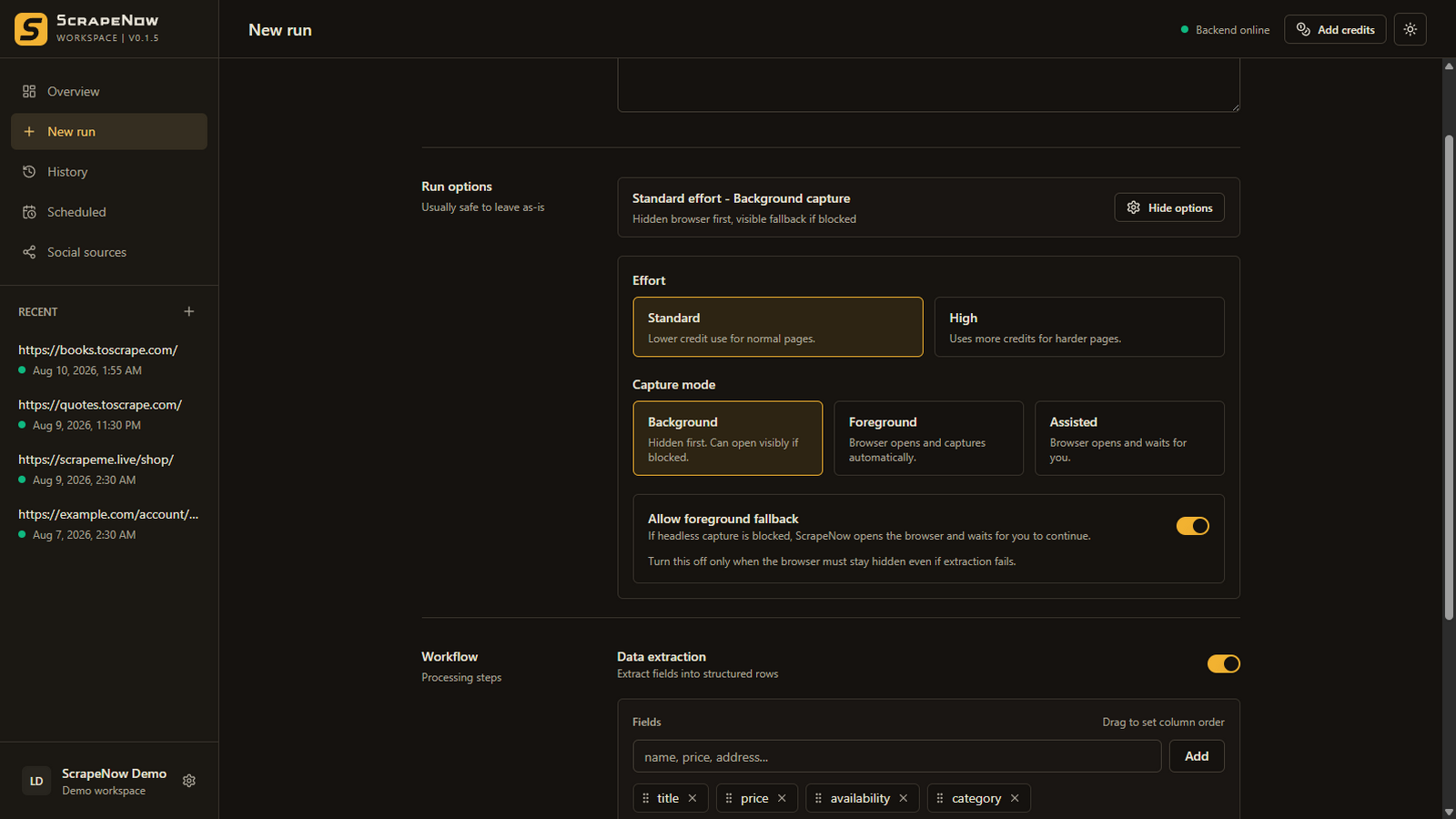
Install ScrapeNow, add a URL, enable data extraction, name the fields that should become columns, choose a capture mode, and run the workflow. Review the returned table and export CSV or JSON. Use Assisted mode if the page needs login, filters, cookie consent, or another manual step.
Step 1
Choose a page and define the outcome
Do not begin with “scrape everything.” Begin with the decision or file you need. For a product page, that might be a CSV containing title, price, availability, and URL. For a directory, it might be name, category, location, and profile link.
Use a public practice website for your first run if you are still learning. The ScrapeNow documentation uses https://scrapeme.live/shop/ with the fields name and price.
Step 2
Create the run
- Open ScrapeNow and select New run.
- Paste the source URL.
- Enable Data extraction.
- Add one field for every column you want.
- Keep Standard effort for the first attempt.
Step 3
Choose the lightest capture mode that works
| Page situation | Start with | Why |
|---|---|---|
| Public page with visible records | Background | It is the simplest default and can fall back visibly. |
| You want to watch page loading | Foreground | The browser stays visible but capture continues automatically. |
| Login, filters, consent, tabs, or scrolling are required | Assisted | ScrapeNow waits while you prepare the page state. |
Step 4
Run, inspect, and correct the schema
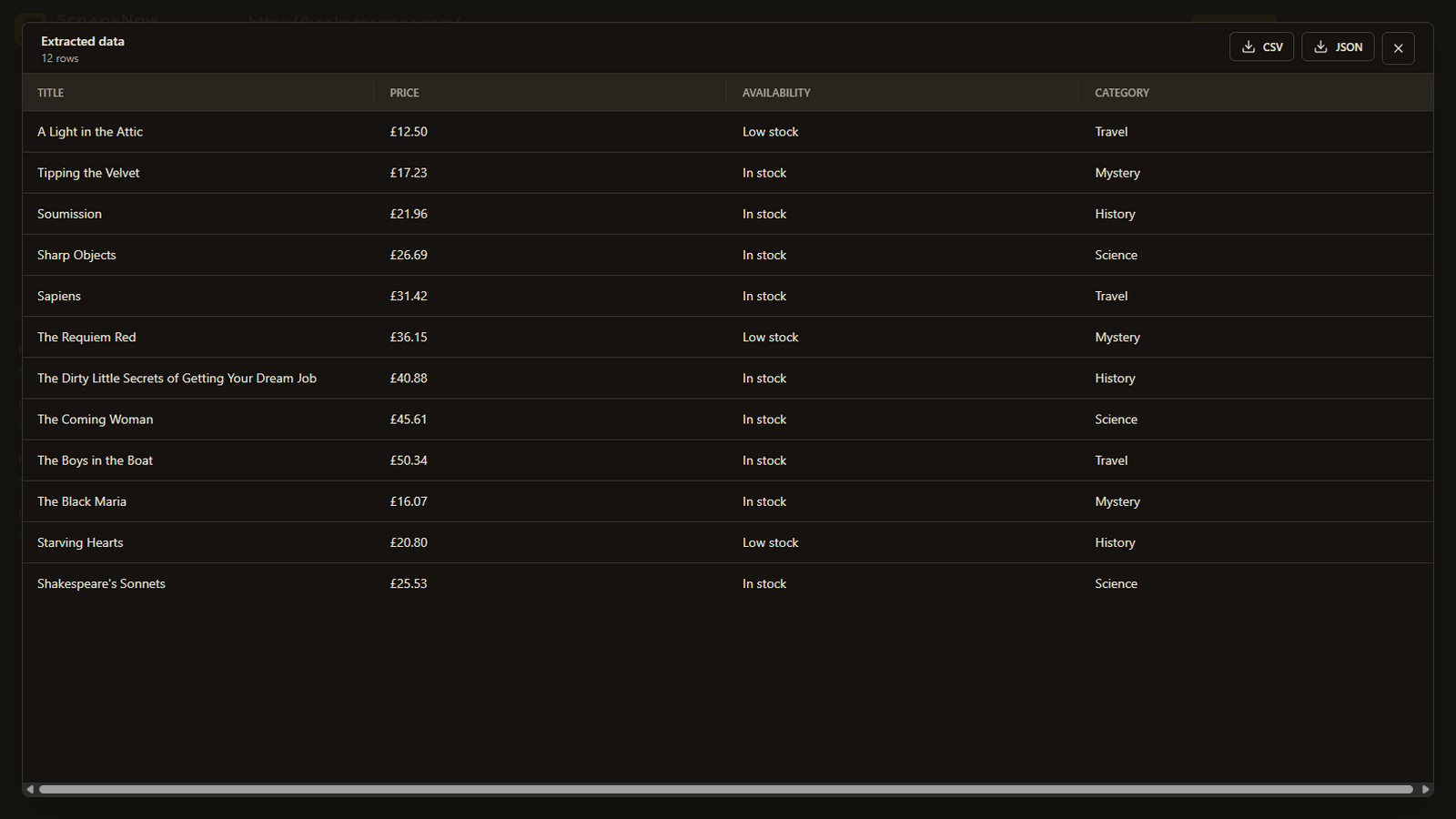
Select Run workflow and wait for the structured rows. Before exporting, inspect several records and check that every column means what you intended.
- If a field is empty, confirm that the information is actually visible on the captured page.
- Replace vague field names with specific ones.
- Try High effort only when Standard misses meaningful structure.
- Use Foreground or Assisted mode if the captured page state was incomplete.
Step 5
Export and preserve the successful setup
Export the completed rows as CSV for a flat spreadsheet workflow or JSON when nested structure is more useful. The run remains in local history, and you can clone a successful configuration instead of starting again.
Avoid first-run mistakes
Keep the first test small and observable
Confirm the schema on one representative page before adding a large URL list.
A scraper cannot reliably return information that is absent from the captured state.
Clear field names make the expected output easier to validate.
Access and process only websites and information you are permitted to use.
Next guides