%20skewX(-10.5)%20translate(-32%20-32)'%3e%3cpath%20d='M49.75%2015H29A8.5%208.5%200%200%200%2029%2032H35A8.5%208.5%200%200%201%2035%2049H14.25'%20fill='none'%20stroke='%2316130E'%20stroke-width='9.5'/%3e%3c/g%3e%3cg%20transform='translate(82%2013)%20scale(1.02)'%20fill='%23E9E3D5'%3e%3cpath%20d='M2%205.5C2%202.46%204.46%200%207.5%200H25v6H8v5h13c3.31%200%206%202.69%206%206v9c0%203.31-2.69%206-6%206H2v-6h18v-9H7.5A5.5%205.5%200%200%201%202%2011.5v-6Z'/%3e%3cpath%20d='M34%209h22v6H41v11h15v6H40c-3.31%200-6-2.69-6-6V15c0-3.31%202.69-6%206-6Z'/%3e%3cpath%20d='M63%209h19c3.31%200%206%202.69%206%206v5c0%202.29-1.28%204.28-3.16%205.29L90%2032h-8l-4.5-6H70v6h-7V9Zm7%206v5h11v-5H70Z'/%3e%3cpath%20d='M105%209h8l13%2023h-8l-2.5-5h-13L100%2032h-8l13-23Zm.5%2012h7l-3.5-7-3.5%207Z'/%3e%3cpath%20d='M131%209h19c3.31%200%206%202.69%206%206v7c0%203.31-2.69%206-6%206h-12v4h-7V9Zm7%206v7h11v-7h-11Z'/%3e%3cpath%20d='M163%209h24v6h-17v3h14v5h-14v3h17v6h-24V9Z'/%3e%3cpath%20d='M194%200h7l16%2020V0h7v32h-7l-16-20v20h-7V0Z'/%3e%3cpath%20fill-rule='evenodd'%20d='M231%209h28v23h-28V9Zm7%206v11h14V15h-14Z'/%3e%3cpath%20d='M264%209h7l4%2015%204-15h7l4%2015%204-15h7l-7%2023h-8l-4-12-4%2012h-8l-6-23Z'/%3e%3c/g%3e%3c/svg%3e)
What you need
A current Chrome browser, a page you are permitted to access and enough browser storage for your results. Chrome 116 is the package minimum. Scraping and saved tables do not require an account; file and Sheets exports require an online allowance check.
Install the standalone extension
Install ScrapeNow from its official Chrome Web Store listing. Version 1.0.0 is the standalone browser extension. Microsoft Edge Add-ons follows; the Windows desktop product remains separate.
After installing, pin ScrapeNow in Chrome’s toolbar and open a normal website. Browser-internal pages such as chrome:// are not supported.
Your first table
- Open a page containing repeated products, listings or other records.
- Click the ScrapeNow toolbar icon, then List Extractor.
- Choose Select a list. If asked, allow access to that website.
- Hover one repeated item and click the highlighted list. Escape cancels selection.
- Choose View & export these rows to inspect the initial table, or collect more.
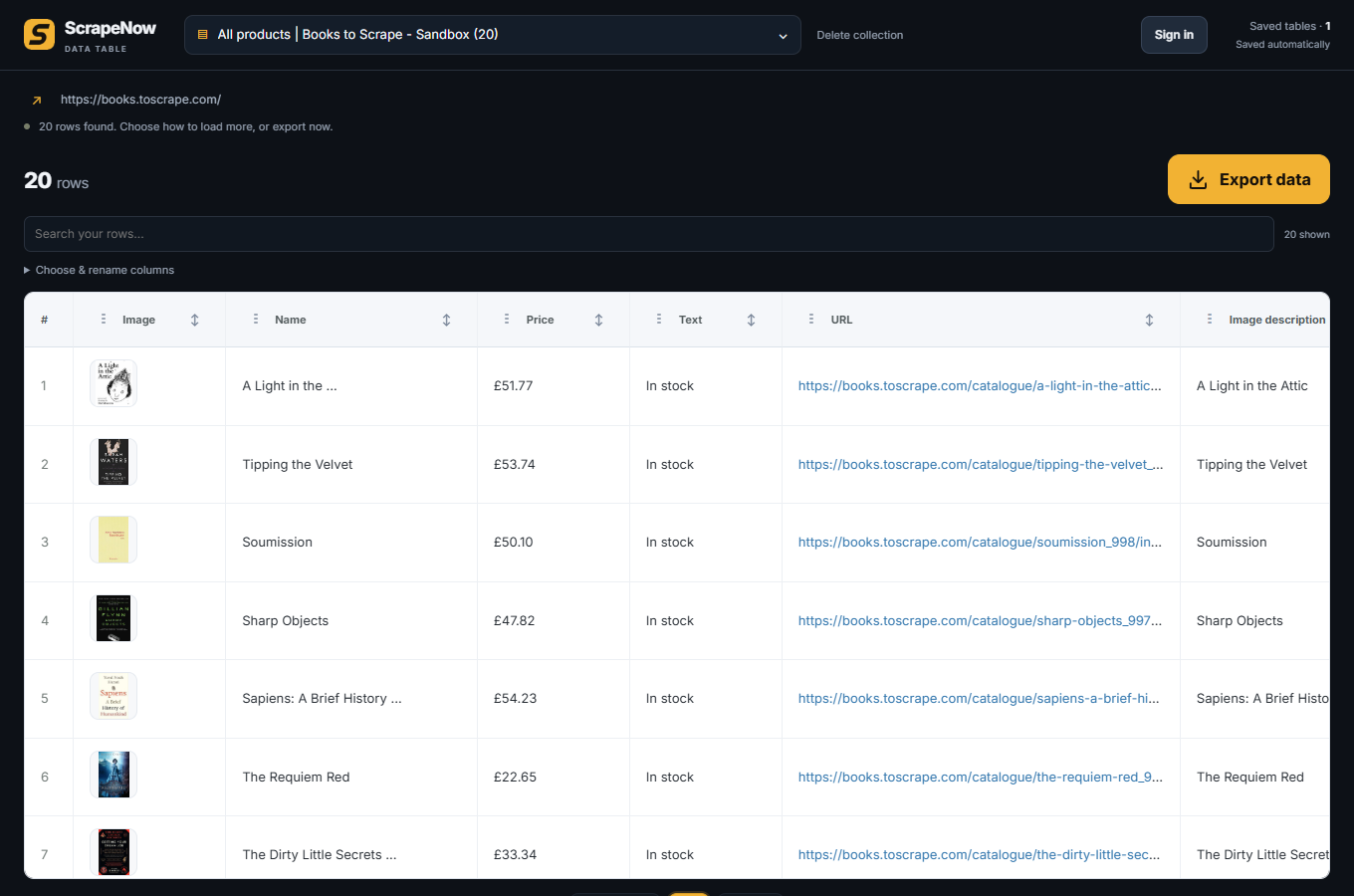
- In Data, rename, reorder or hide columns. Export the visible rows.
List Extractor: collect more rows
Choose This page, Auto-scroll, Next page or Load more. For the last two modes, select the matching button on the source page before starting.
Start collecting saves rows as they arrive. Stop & keep rows retains completed work. Finishing or stopping opens the separate Data window. Closing that window does not delete the table or stop a collection.
Detection depends on repeated accessible page structure. It does not guarantee every review list, product grid or virtualized feed.
Image Extractor
Open Image Extractor on the current page. Review the gallery, filter results and download selected original images. Saved gallery records contain metadata and URLs, not a permanent copy of remote image bytes. Download files you want to keep; remote image links can disappear.
Page and bulk extraction
Page Extractor saves a row with available page title, readable text, links and metadata. Choose main-content or whole-page text.
Bulk Page Extractor accepts pasted URLs or a CSV and visits them sequentially. One result row is saved per URL; failed pages are reported and the queue continues. Multi-URL jobs need an online plan check. A single unique URL can be extracted locally while signed out and offline.
Free permits 1 URL per job; Personal 25; Pro 250; Business 2,000. Page text is capped at approximately 100,000 characters and bulk tables at approximately 6 MiB, so very long pages can reach storage limits earlier. A browser restart interrupts the job but retains saved rows. Start a new job to continue.
Custom reusable field selection across URLs is not included in this release.
Saved tables and exports
Data keeps earlier collections in a searchable dropdown. Search and sort rows; click a column label to rename it, drag its grip to reorder, or use Choose & rename columns to hide it. Exported files follow the visible data and column order.
Export data offers Excel, CSV, JSON and copy CSV. Google Sheets is a separate button. Inspect a small export before using it in your next workflow.
Export to Google Sheets
- Open the saved table in Data and choose the columns you want.
- Click Google Sheets and allow the requested service access.
- Choose the Google account that should own the spreadsheet and authorize per-file Drive access.
- ScrapeNow creates a new spreadsheet, writes the visible headers and rows, and opens it.
Sheets authorization is separate from ScrapeNow sign-in. It can use a different Google account without replacing your ScrapeNow session. If authorization expires, click Google Sheets again to reconnect. Cancelled or failed exports display an error; retry after resolving it. Values are written literally, not executed as spreadsheet formulas.
Accounts, plans and export allowance
Local scraping and saved tables work signed out. Accounts identify licenses and export allowance. The free allowance is 5,000 rows per UTC day. Personal, Pro and Business provide 25,000, 100,000 and 500,000 rows respectively.
Each collection uses its daily row high-water mark across all formats. Export 100 rows, then the same 100 to another format: the second export adds no usage. Export 120 rows from that collection later that day: only 20 additional rows count. A different collection counts separately. Days reset at midnight UTC.
Anonymous export usage is claimed when you sign in. Lifetime extension purchases and tier-difference upgrades are separate from desktop subscriptions and AI credits. Licenses activate after the server receives a verified payment webhook.
Permissions and local data
The toolbar grants temporary access to its source tab; the panel can request access to a chosen website. Account, allowance and Sheets service access is requested when needed. The extension does not send extracted page content to an AI service.
Delete collection removes that saved local table after confirmation; stop a running collection first. Signing out does not delete tables, hosted billing records or Google spreadsheets and does not disconnect Sheets authorization. Downloaded files remain on disk.
Export important tables before uninstalling or removing the browser profile. Read extension privacy information.
When something does not work
For missing rows, check that the content is visible and the correct repeated list was selected. Allow site access, finish legitimate login/consent steps yourself and try a small collection first. The extension does not bypass CAPTCHAs or access controls.
If a job stops, inspect the saved rows and visible error. Very large pages may reach storage limits; slow pages can time out. For Sheets, reconnect when prompted and check your Google account choice.
Contact reda@automation-campus.com with the browser, extension version, source domain and error. Never send passwords, cookies, tokens or sensitive extracted rows.
Social links and YouTube videos
Social link finder visits business websites to find public profile links. You can optionally check About/Contact pages for public email addresses shown there. Use the current page, pasted URLs, a CSV or a saved table as input.
The YouTube videos tool extracts a channel’s Videos tab and optionally visits video details. Finding an Instagram or TikTok profile link does not mean that its posts have been extracted. Dedicated TikTok, Instagram, Facebook, LinkedIn and X content templates are not available.